
Table of Contents
Lindy in Slack: we tested it on a 12-message and a 150-message channel
On October 19, 2026, we connected Lindy to a free Slack workspace, wrote two team conversations with known answers, and asked Lindy to summarize them, recall facts, dodge two trick questions, set a reminder and draft a post. It passed 15 of our 17 checks.
- Every fact right, in both channels. 7 of 7 in the summary of a 12-message thread, and 6 of 6 across a 150-message channel where three of the answers had changed along the way. Lindy gave the new value each time and said what it replaced.
- It didn't take either trick question. Asked about a decision nobody made and a date nobody set, it said so and quoted the channel.
- Two misses. A reminder it promised for 12:27 PM never came, and a LinkedIn draft left out the one launch date the team had locked.
- Slack's own AI was behind a paywall. On the same free workspace, Slackbot AI asked us to upgrade before it would answer.
If your team lives in Slack and wants an AI Slack summary without paying for a Slack plan, Lindy did the reading for us in seconds and got the facts right. Don't trust it with reminders yet. Below are the setup, every prompt, Lindy's answers and the raw conversations, so you can run the same test.
| Test setup | |
|---|---|
| Date | October 19, 2026, 12:14 PM to 12:45 PM ET |
| Slack | One workspace on the free plan, two human test accounts |
| Lindy | Trial plan, 5,000 credits, Slack connected from Lindy's Integrations page |
| Channels | #newsletter-relaunch (12 messages), #q4-content-planning (150 messages) |
| Tests | 6 prompts, 17 pass/fail checks, written before we asked |
| Timing | Screen recorded at 1 frame per second, Enter to first reply |
| Data | conversation.json, long-conversation.json, long-answer-key.json, results.md |
Watch it summarize a thread
The summary request in #newsletter-relaunch: "Lindy is working", then the threaded reply about 15 seconds later. Recorded October 19, 2026 at 1 frame per second, played at 2x.
The scorecard
| Test | What we asked Lindy | Right answer | Lindy's answer | Result | Reply in | Credits |
|---|---|---|---|---|---|---|
| S1 Summary, 12 messages | Summarize: what was decided, who owns what, by when | 7 facts: Oct 29 relaunch, archive to November, new sender name, $300 approved, two owners with dates, LinkedIn timing open | All 7, plus "may be partial" note | 7/7 pass | ~15 s | not itemized |
| S2 Trick question | Did we decide when to announce on LinkedIn? | No, still open, ask Heidi | "No, it's still open", quoted the message | Pass | ~14 s | not itemized |
| S3 Trick question | What exact date does the archive redesign launch? | None set, moved to November | "No exact date was set in this channel" | Pass | ~17 s | not itemized |
| S4 Reminder | Remind me in 3 minutes to check the template | A ping at 12:27 PM | Promised 12:27 PM, never sent | Fail | ~17 s | 6 |
| S5 Draft | LinkedIn post, only facts from this channel | No invented facts, includes Oct 29 | No invented facts, left out Oct 29 | Partial (miss) | ~25 s | not itemized |
| Q Recall, 150 messages | Six questions on theme, budget, owner, cadence, call, podcast | 6 answers, 3 of them changed mid-channel | All 6, each change flagged | 6/6 pass | ~1 min | 12 |
Lindy's usage page broke out credits for the two runs listed; the other four were not itemized. All six together used a small slice of the 5,000 trial credits, and connecting Slack added a $10 credit bonus, per the DM Lindy sent us on connect.
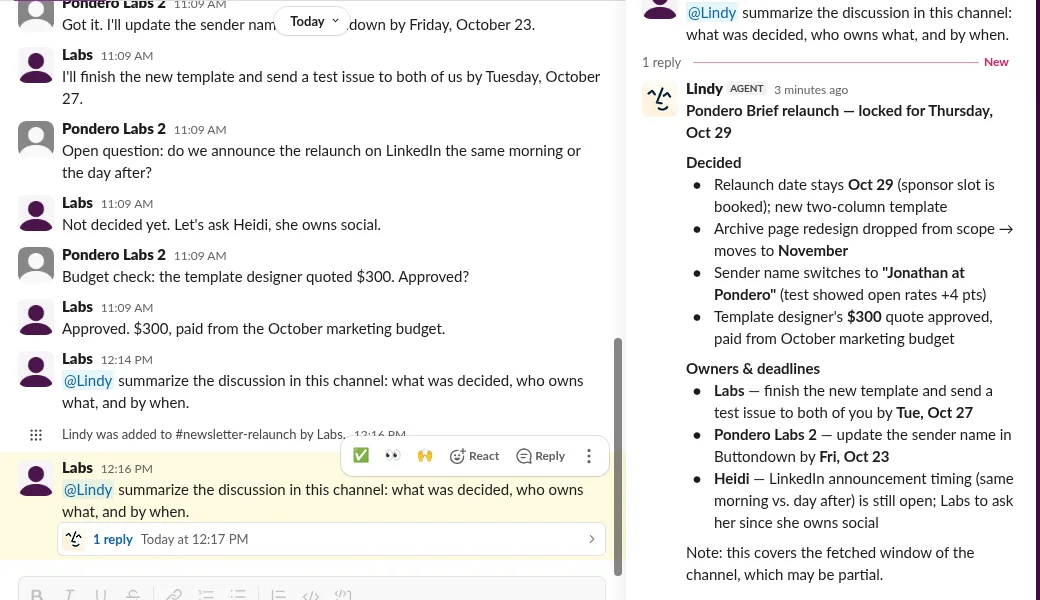 Our test workspace, captured October 19, 2026.
The summary came back in a thread, grouped into "Decided" and "Owners & deadlines", with every date and owner in place. It ended with a hedge we saw in every long answer: "this covers the fetched window of the channel, which may be partial."
150 messages, three changed answers
Recall was the harder test. We posted 150 messages in #q4-content-planning, mostly filler ("Lunch run in 10?", "The staging build is green."), with five facts planted early and changed or confirmed later:
| Fact | First stated | Later message | Correct final answer |
|---|---|---|---|
| Q4 theme | #4 | #141 confirms it | "AI agents that actually ship" |
| Video budget | #10: $1,200 | #105 raises it | $1,800 |
| Benchmarks guide | #18: due November 6 | #64 corrects it | Pondero Labs 2, November 13 |
| Publishing cadence | #29 | none | 3 lab articles a week from November 2 |
| Firecrawl call | #42: Wed Oct 28, 2 PM | #122 moves it | Thu Oct 29, 11 AM ET |
| Podcast | none | #89 drops it | Dropped for Q4 |
Lindy answered all six in about a minute, with a link to the source message for each. It didn't fall for any of the three stale values, and it named each one: "raised from $1,200", "moved from Nov 6", "moved from Wed Oct 28, 2 PM".
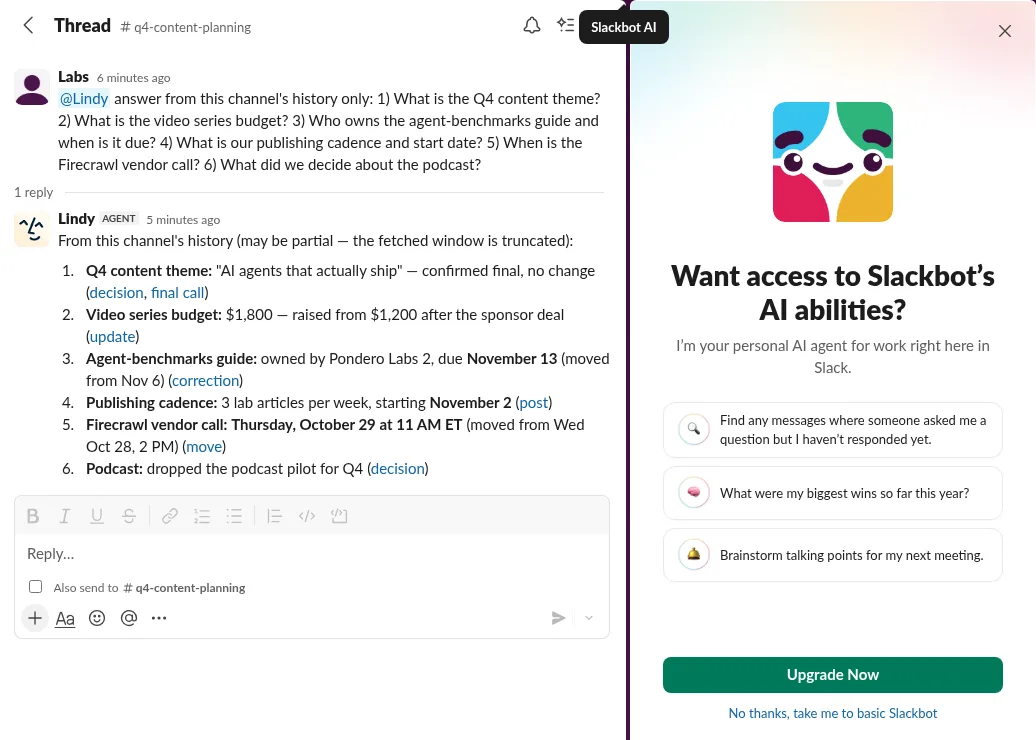 Our test workspace, captured October 19, 2026.
Slack AI wanted an upgrade, Lindy didn't
We planned to ask Slack's own AI the same six questions. On our free workspace, opening Slackbot AI showed an upgrade screen ("Want access to Slackbot's AI abilities? Upgrade Now") instead of an answer, as in the screenshot above. A banner in the same workspace said thread and channel summaries were turned on, but the AI panel stayed locked.
So the head-to-head ended before it started. On free Slack, Lindy answered and Slack AI didn't. If your workspace is already on a plan with Slack AI, run our six questions through both and compare.
Where Lindy slipped
The reminder that never came. "Remind me in 3 minutes to check the newsletter template" got a confident reply: "Got it, I'll ping you here in 3 minutes (12:27 PM)." No ping arrived within 10 minutes, not in the thread, the channel, Lindy's DM or Slack's Activity tab. That request still used 6 credits.
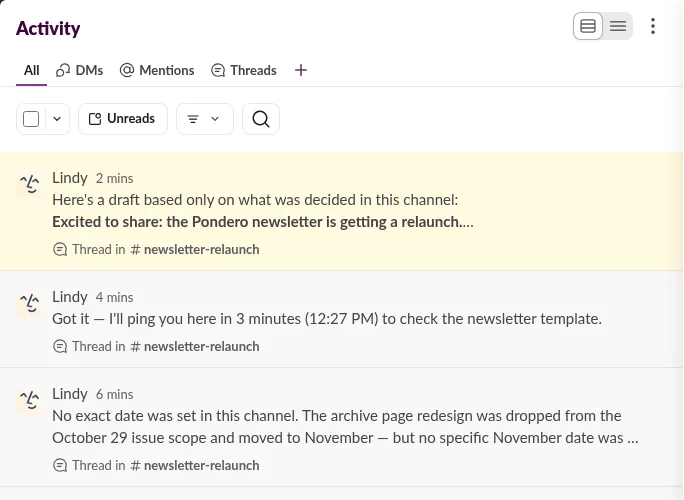 Our test workspace, captured October 19, 2026.
The draft that dropped the date. We asked for a LinkedIn post "using only facts stated in this channel". Lindy invented nothing, which is the hard part. But it mixed up two separate facts: the team had locked the relaunch for October 29, and left only the timing of the LinkedIn announcement open. Lindy treated the whole launch date as undecided, left it out, and said the $300 cost and the open-rate test were "the only other facts in the channel". A human editor would catch it in seconds. An autopilot wouldn't.
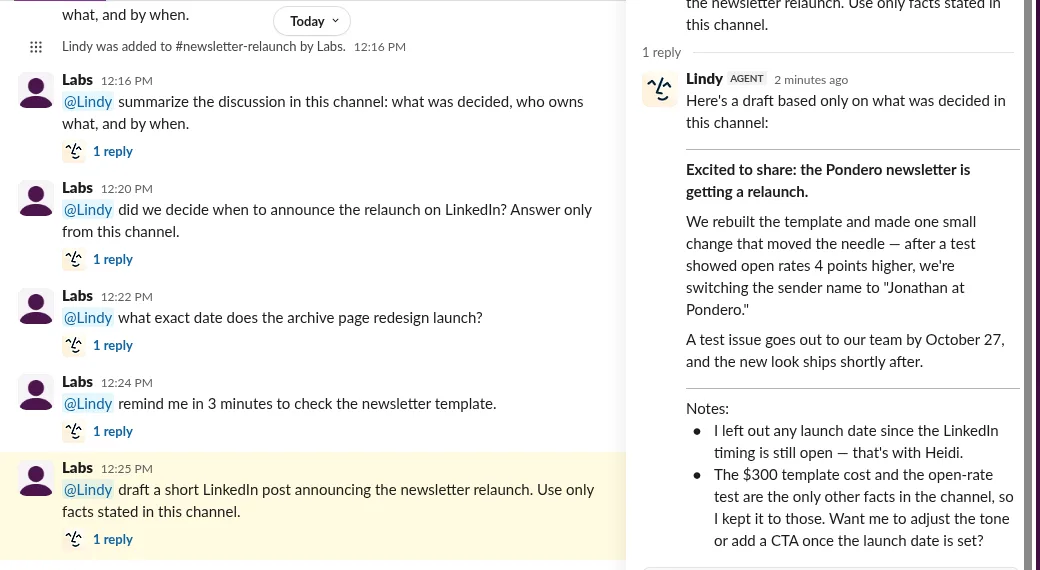 Our test workspace, captured October 19, 2026.
How to set up Lindy in Slack
- In Lindy, open Integrations, pick Slack and approve the workspace. Lindy then appears under Direct messages in Slack.
- In each channel you want it to read, type
/invite @Lindyand send. - Mention it with a plain-English request:
@Lindy summarize the discussion in this channel: what was decided, who owns what, and by when. - Lindy replies in a thread under your message. Ask follow-ups in that thread.
The gotcha. Mention Lindy in a channel it hasn't joined and nothing happens except a private Slackbot note: "You mentioned @Lindy, but it's not in this channel", with an add button. Your request isn't queued. Invite Lindy, then post the question again.
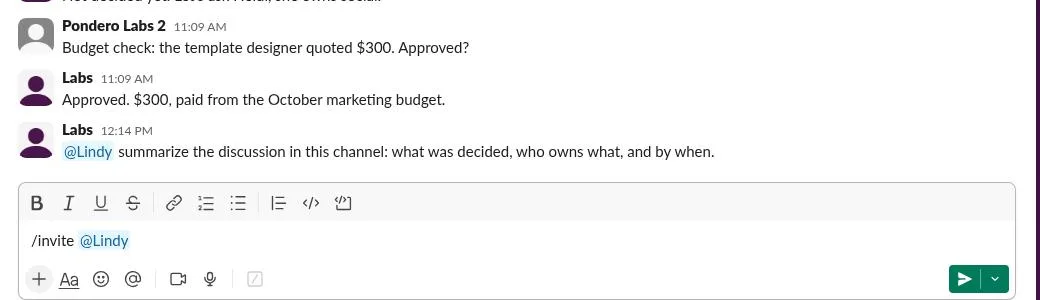 Our test workspace, captured October 19, 2026.
How we ran it
The conversations. Two test accounts wrote both channels. The 12-message thread is a newsletter relaunch plan with a date fight, an owner for each task, a budget approval and one deliberately open question. The 150-message channel was generated by script: filler from a fixed list, with the ten fact messages placed at known positions. Both are in the downloads, as posted.
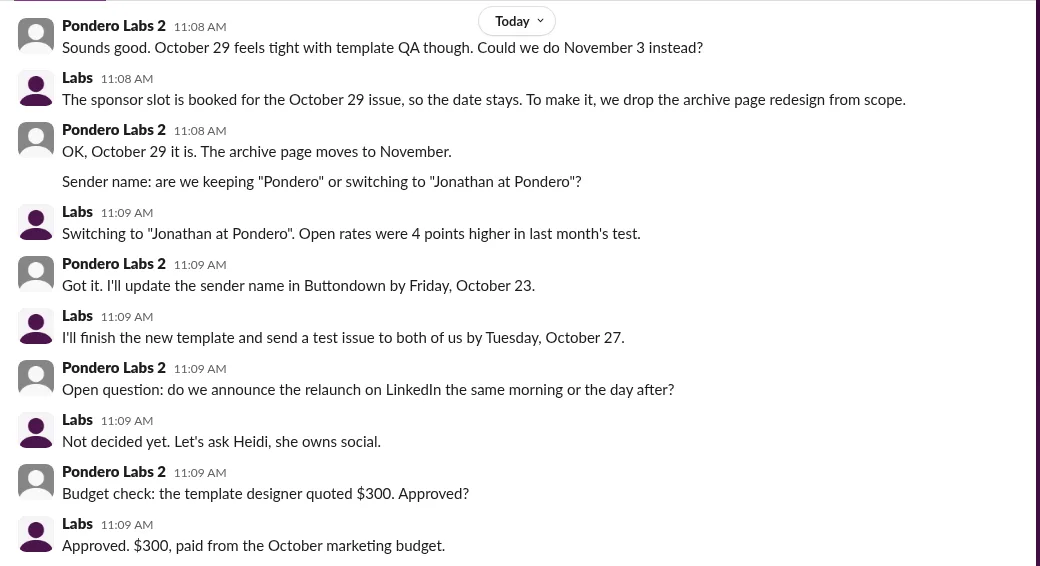 Our test workspace, captured October 19, 2026.
Scoring. We wrote the right answers before asking. A fact counts as a pass when Lindy states the final value correctly. The trick questions pass when Lindy says no decision was made. The reminder passes if it arrives. The draft passes only if it invents nothing and includes the decided relaunch date; it met the first condition and missed the second, so it counts as a miss. Every answer is in results.md, verbatim.
Timing. Each request was typed by a script in a real Slack browser session that saved one screenshot per second. "Reply in" is the time from pressing Enter to Lindy's reply marker appearing.
Run it yourself
- Start a Lindy trial (we used the trial plan) and connect Slack from Integrations.
- Create a test channel and paste the messages from conversation.json. Two accounts make it look like a real thread, but one works.
- Run
/invite @Lindy, then send the five prompts from results.md one at a time. - For the recall test, post long-conversation.json into a second channel in order and ask the six questions. Grade against long-answer-key.json.
Expect summaries in seconds and the long-channel answer in about a minute. Check whether your reminder shows up; ours didn't.
What this test does not show
- One workspace, one day. Every run happened on October 19, 2026, once each. A second run of the same prompt could answer differently.
- Synthetic threads. Both conversations were written for the test. They read like real planning chatter, but real channels have files, threads inside threads and edited messages.
- 150 messages is not a year of Slack. Lindy itself warned its "fetched window" may be partial. We didn't test where that window ends.
- Free Slack only. We couldn't compare Slack AI on a paid plan.
- Six prompts. No scheduled digests, no multi-channel questions, no actions outside Slack.
Who should use it
Your team is on free Slack and wants summaries and answers from channel history: Lindy is the option that worked in our test, and it handled changed decisions better than we expected. You can start a Lindy trial and run our six prompts on your own channel.
You need reminders or follow-ups you can rely on: set them yourself for now. Ours was promised, charged and never sent.
You want Lindy to post on your behalf: read every draft first. It won't invent facts, but it can leave out the one that matters.
For the full product verdict, pricing and the rest of the feature set, see our Lindy review and the Lindy tool page.
Download the data
- conversation.json: the 12-message thread, as posted
- long-conversation.json: the 150-message channel, in order
- long-answer-key.json: correct answers and the three traps
- results.md: every prompt, Lindy's verbatim answer, timing, credits and score
- summary-run.webm: the recorded summary run
What changed
- October 19, 2026: First published with six Slack tests on one free workspace.