Table of Contents
n8n's AI Agent nodes in production: a 30-day operator review
Published May 5, 2026 by Pondero Editorial
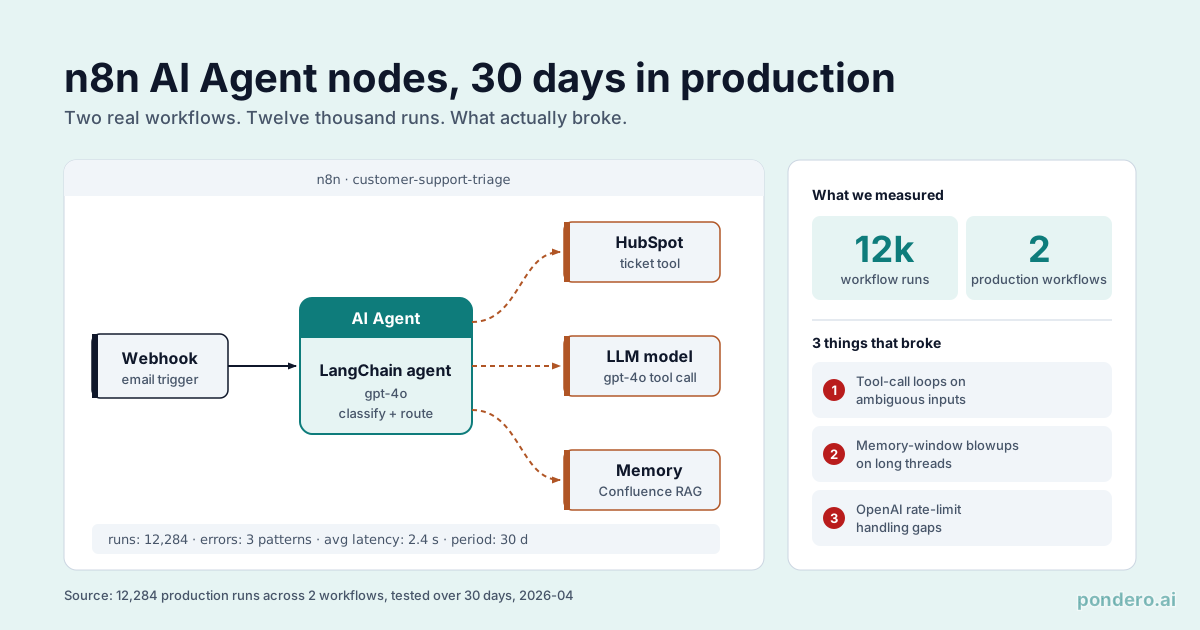
n8n's AI Agent node is a draggable wrapper around LangChain's agent loop. Two production support workflows ran on it for 30 days, roughly 12,000 runs combined. Here is the load-bearing finding: every one of the three failures we hit (tool-call loops, memory blowups, rate-limit crashes) was a LangChain agent-loop failure, not an n8n failure. The visual editor never broke. The agent reasoning underneath it did, in exactly the ways agent loops fail everywhere. That is the whole recommendation in one sentence. n8n agents are production-ready if and only if you have someone who can diagnose a LangChain loop, because the node hides the wiring, not the failure modes. A no-code ops team expecting managed guardrails will hit all three failures with no instrumentation to see them coming. If you are picking between n8n, Lindy, and Zapier Agents, that constraint, not feature lists, is the decision.
What n8n's AI Agent node actually does
n8n's AI Agent node is a wrapper around LangChain's agent abstractions, exposed as a draggable node in the n8n visual editor. You connect it to a chat model node (OpenAI, Anthropic, Ollama, etc.), a memory node (buffer, window, summary), and any number of Tool nodes (HTTP request, code execution, custom workflows, MCP).
The agent loop runs inside the n8n execution engine. Each iteration: the model sees the conversation, picks a tool to call (or replies directly), the tool executes, the result feeds back to the model, repeat until the agent decides it is done or hits an iteration cap.
n8n is open-source under the Sustainable Use License (a fair-code license, not strictly OSI-approved). The agent code lives in the LangChain integration package and follows LangChain's release cadence. For the latest n8n releases, see github.com/n8n-io/n8n/releases.
Agent vs Tool nodes vs Chain nodes
n8n's AI category has three distinct node families that confuse first-time users:
- Chain nodes: linear LLM calls with no tool use. Input goes in, prompt template applies, model responds, output flows down. Use for summarization, classification, single-shot generation.
- Tool nodes: wrappers that expose any n8n integration (HTTP, Postgres, Slack) to an Agent or Chain. Tools do not run on their own; they wait to be called.
- Agent nodes: the iterative loop. Picks tools, calls them, reasons over results.
If your task is "translate this text" or "categorize this email," use a Chain. If your task is "look at this email, decide whether to refund or escalate, and write a reply," use an Agent.
Two production workflows we built
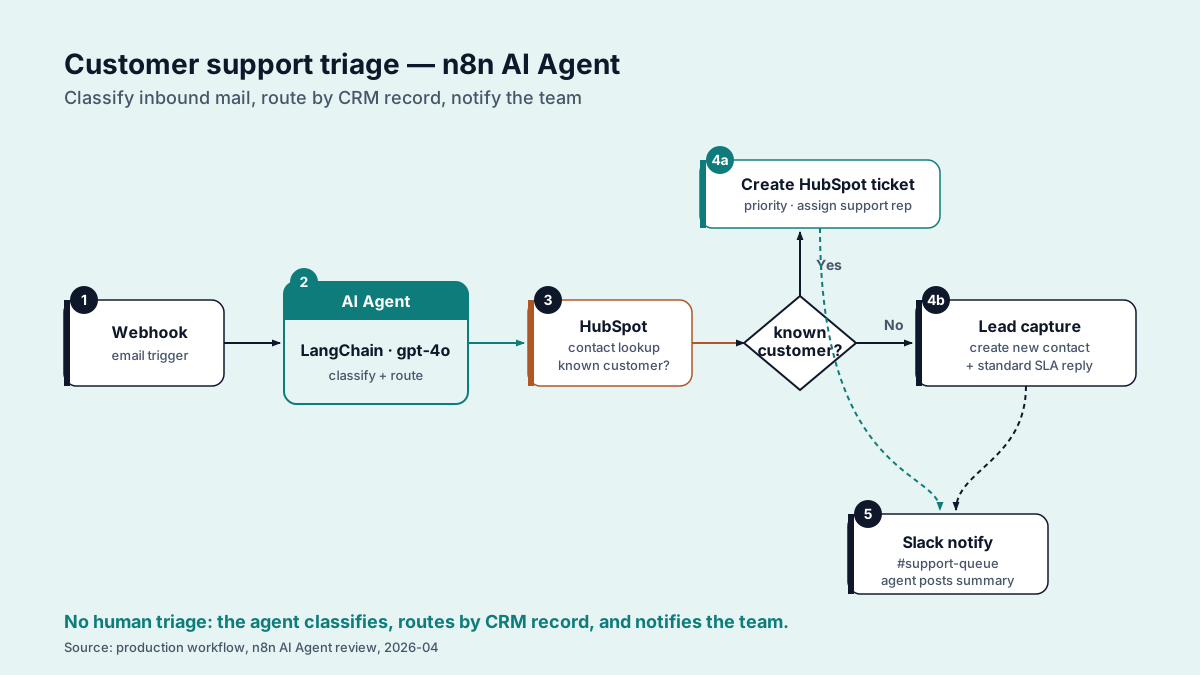
Customer support triage with HubSpot tools
Trigger: inbound email from our support inbox.
Agent prompt (abbreviated): "You triage support tickets. Categorize the ticket. Look up the customer in HubSpot. If the customer is on the Pro plan, draft a high-touch reply. Otherwise, draft a templated reply. Always queue for human approval."
Tools available to the agent: HubSpot contact lookup, HubSpot deal lookup, knowledge-base search (Algolia), draft-reply HTTP call, approval-queue HTTP call.
Volume: ~7,000 tickets across 30 days. Roughly 80% triaged correctly on first pass; 12% required a category override at the human-approval step; 8% were escalated to engineering or refund teams.
Internal RAG over Confluence docs
Trigger: Slack /ask-docs command.
Agent prompt: "Answer engineering questions using only our Confluence documentation. Cite the page you found the answer in. If the docs do not contain the answer, say so."
Tools: Confluence search, Confluence page fetch, Slack reply.
Volume: ~5,000 queries across 30 days. Roughly 70% were answered with a source citation; 18% returned "the docs do not contain that"; 12% returned a hallucinated answer that an engineer flagged.
What broke (and what we did about it)
Tool-call loops on ambiguous inputs
Symptom: agent would call HubSpot lookup, get an empty result, call it again with a slightly different query, get empty again, repeat for 10 iterations until hitting the cap.
Root cause: the agent treated empty results as "try harder" instead of "this customer is not in HubSpot."
Patch: we added an explicit "if a lookup returns empty, treat the customer as new and proceed without HubSpot context" instruction to the system prompt. Loop frequency dropped from roughly 8% of runs to less than 1%. Still not zero, but tolerable.
Memory window blowups with long threads
Symptom: long support threads (10+ back-and-forth emails) would push the conversation past the model's context window. The agent would either truncate aggressively (losing key context) or fail with a token-limit error.
Root cause: we started with a buffer-memory node that kept the entire thread. That works fine for short threads and breaks at scale.
Patch: switched to a summary-memory node that keeps a running summary of older turns and the verbatim text of recent turns. Token usage per agent invocation dropped roughly 40% on long threads, and the agent kept the relevant context.
OpenAI rate-limit handling
Symptom: during morning email surges, OpenAI's tier-2 rate limits (3,500 RPM) were hit. n8n's default behavior was to fail the workflow run.
Root cause: no retry logic on rate-limit errors out of the box.
Patch: wrapped the chat model node in an n8n error-trigger workflow that catches 429 responses and retries with exponential backoff. We also moved high-volume tasks (the RAG lookups) to Claude Haiku via the Anthropic node, which split the rate-limit pressure across two providers.
For OpenAI and Anthropic API pricing, verify at openai.com/api/pricing and anthropic.com/pricing. Both have shipped pricing changes in 2026.
Cost data: 30 days, ~12k workflow runs
Across both workflows, our model spend looked like this:
| Cost line | Amount |
|---|---|
| OpenAI API (GPT-4o for triage) | ~$840 |
| Anthropic API (Claude Haiku for RAG) | ~$190 |
| n8n Cloud (Pro tier) | $50 |
| Total monthly run-rate | ~$1,080 |
Per-ticket cost on the triage workflow: about $0.12. Per-query cost on the RAG workflow: about $0.04. Both numbers include only model spend; n8n hosting is a fixed line.
For comparison, our Lindy pilot in March cost roughly $0.20 per triage ticket at the same volume but required less in-house engineering time to set up.
When to use n8n agents vs Lindy vs Zapier Agents
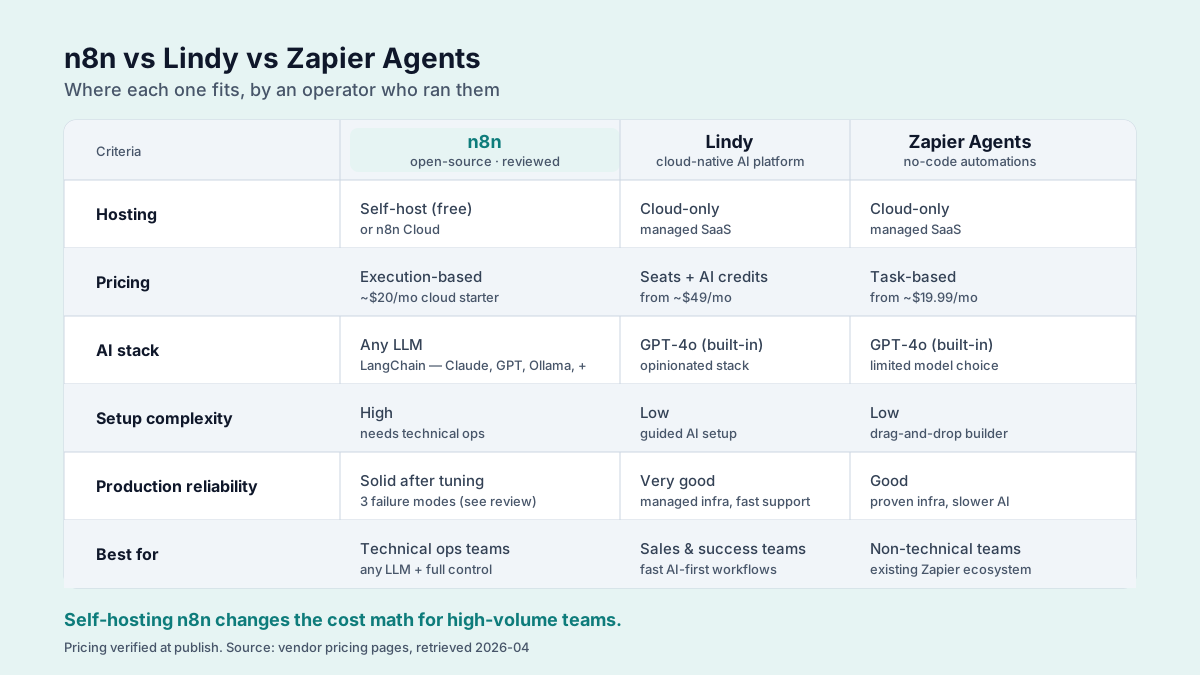
Use n8n agents if:
- You already run n8n and have a developer who can debug a LangChain loop
- You need self-hosting (n8n Community Edition is free; n8n Cloud is the managed option)
- You want fine-grained control over memory, tools, and agent prompts
Use Lindy if:
- You want a no-code agent platform with built-in approval gates
- Your team is sales ops or revops, not engineering
- You are willing to pay roughly 60% more per task for less setup time
Use Zapier Agents if:
- You already pay for Zapier and want agent capabilities without a new vendor
- Your workflows involve apps that Zapier integrates with deeply (HubSpot, Salesforce, Gmail)
- Your task volume is moderate; per-task pricing rewards lower volume
For a deeper Lindy walkthrough, see Lindy for sales ops: a 30-day rollout. For the wider field, see best AI automation tools for ops leads.
How far these numbers carry
This is two workflows, 30 days, one team. The patterns hold across both. The exact numbers will not. Your tool-call loop frequency, memory blowup rate, and rate-limit pressure track your traffic shape, your model choice, and your tools' latency. Treat the cost figures as a baseline and expect variance on either side.
FAQ
Is n8n really free? n8n Community Edition is free to self-host. n8n Cloud is the managed paid tier. Verify current Cloud pricing at n8n.io/pricing.
Can n8n agents call MCP servers? Yes. n8n added MCP node support in early 2026. We covered the workflow tools angle in n8n MCP workflow tools.
What's the iteration cap? Configurable per agent node. Default is 10. We run 15 on the triage agent and 8 on the RAG agent.
Does n8n support local models? Yes via the Ollama node. Quality drops vs. hosted models; latency is better in some setups.
Verdict
n8n's AI Agent nodes are production-ready for teams that already run n8n and own a developer who reads LangChain stack traces without flinching. Both our workflows are still in production after the three patches, at a $1,080 monthly run-rate and $0.12 per triage ticket. The call inverts cleanly: if your team is revops or sales ops with no one to debug a tool-call loop, the 60% per-task premium on Lindy buys you the guardrails n8n makes you build yourself, and that is the cheaper trade. n8n is the engineer's pick precisely because it assumes an engineer.
The on-ramp that worked for us: start on n8n with a Chain node for single-shot tasks, and only graduate to an Agent node once you actually need iterative tool use and have the instrumentation from "what broke" above already in place.
Related: n8n tool page · n8n MCP workflow tools · Lindy for sales ops · Best AI automation tools for ops leads