Proton Lumo Review (2026): Lumo Desktop, MCP Connectors, and the Updated Verdict
Published August 14, 2026 · Updated November 20, 2026 · by Jonathan Hildebrandt
The short version
Lumo Desktop adds shell, filesystem, and custom MCP server connectors on macOS, Windows, and Linux. Here is how much that closes Lumo's automation gap against Claude Desktop and ChatGPT Business, with pricing current as of November 20, 2026.
Pros
- ✓Lumo Desktop for macOS, Windows, and Linux adds connectors for local files, shell execution, Proton Mail, third-party apps, and your own local or remote MCP servers, with connector data kept under zero-access encryption, per proton.me/support/lumo-connectors
- ✓Every connector action can be set to Auto-approve, Ask human, or Deny, and scheduled tasks carry their own permissions, per proton.me/support/lumo-connectors and proton.me/support/lumo-schedules
- ✓Apertus 1.5, a fully open Swiss model from EPFL and ETH Zurich, is selectable inside Lumo, so a regulated team gets an inspectable model without data leaving Proton's encrypted infrastructure, per proton.me/blog/lumo-apertus-partnership
- ✓Zero-access encryption plus GDPR and HIPAA support backed by ISO 27001 and SOC 2, per proton.me/business/lumo/pricing
Cons
- ✕Connector actions default to Auto-approve and every connector is switched on in every conversation until you change it, per proton.me/support/lumo-connectors
- ✕Still no public API: Lumo can now call out to your tools, but nothing in your stack can call Lumo, and connectors exist only in the desktop app, per proton.me/lumo/download
- ✕Proton's connector docs describe per-user settings only; there is no documented admin allowlist of the kind Claude Team and Enterprise owners get, per support.claude.com
- ✕On hard multi-step reasoning the open models still trail GPT-5.x and Claude Opus, and the in-chat charting is basic next to ChatGPT's data analysis
Proton Lumo Review (2026): Lumo Desktop, MCP Connectors, and the Updated Verdict
Two months ago this review docked Lumo for one specific gap: no API, no CLI, no way to wire it into scripts or agents. On November 17, Proton shipped Lumo Desktop for macOS, Windows, and Linux, and its connectors let Lumo read local files, run shell commands, pull mail through Proton Mail Bridge, and call any local or remote MCP server you point it at (Proton support, TechCrunch). That is the automation surface we said was missing. The rating still holds at 4.2, and the reason is in the defaults.
If your data can legally live on OpenAI or Anthropic servers, keep ChatGPT Plus or Claude Pro. If it cannot, Lumo Desktop turns Lumo from a private chat window into a private assistant that can act on your files and tools, and it is worth installing today. Before you connect anything, flip shell and send actions from Auto-approve to Ask human. Proton ships them on Auto-approve (Proton support).
What changed in November: Lumo Desktop and connectors
Lumo was a chat window until this release. Lumo Desktop adds three systems at once: Connectors, Schedules, and Skills (Proton blog). Connectors are the part that matters for this review, and Proton's support doc lists four kinds (Proton support):
- Local tools, including filesystem access and shell execution (Proton's launch post adds browser content fetching)
- Proton Mail, through Proton Mail Bridge
- Third-party services; the support doc names Slack, Atlassian, Dropbox, and Google Drive, and TechCrunch's launch coverage names Confluence, Dropbox, and Jira
- Custom MCP servers, both local (stdio) and remote (HTTP)
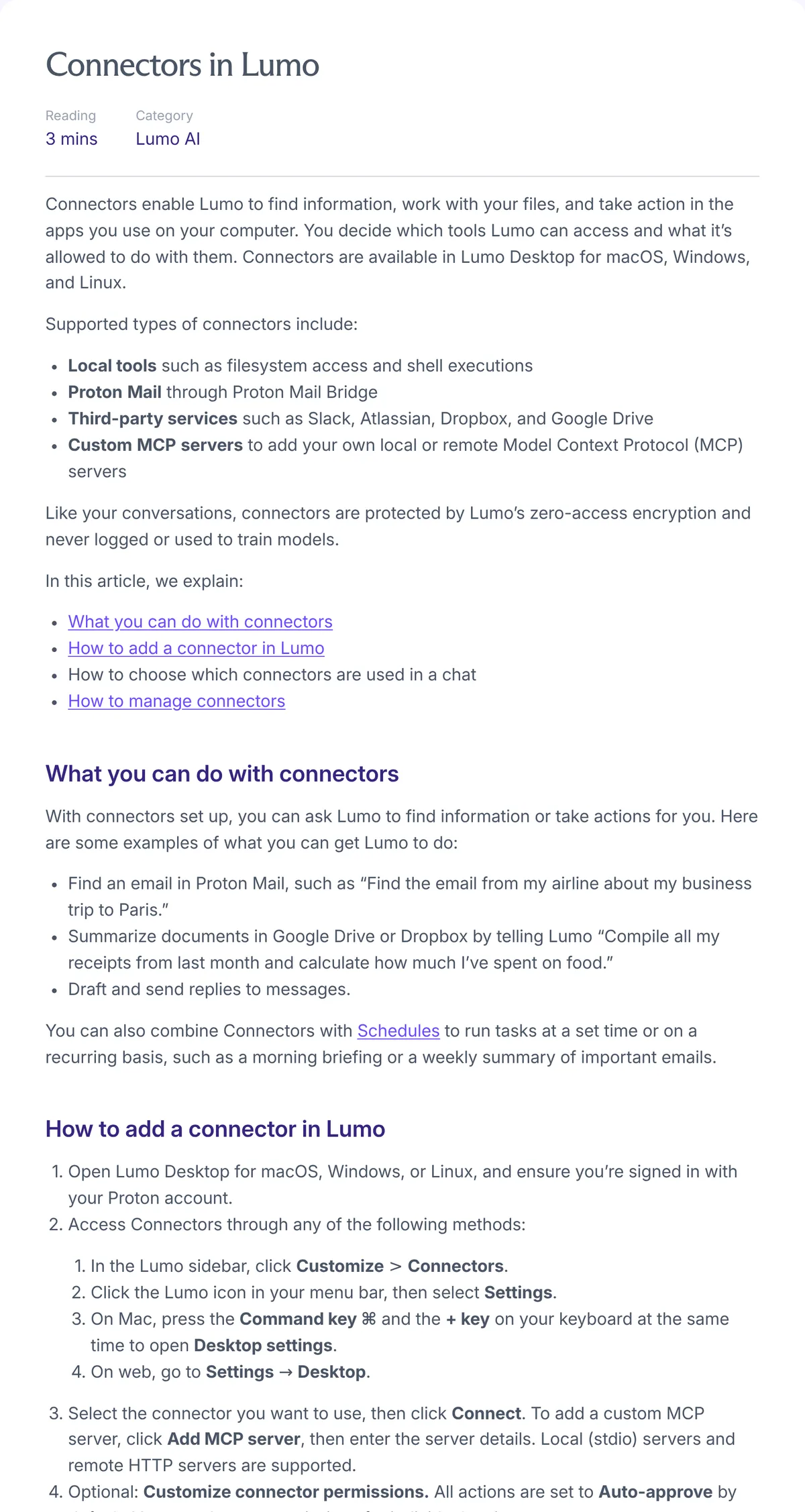 Source: proton.me, captured November 20, 2026.
Schedules let Lumo run a task at a set time or on repeat, like a weekly summary of emails that need a reply, and each scheduled task gets its own connectors and its own permissions (Proton support). Skills save reusable instructions, templates, and reference files, and existing Custom Lumos migrate into Skills automatically (Proton blog).
Proton's pitch is that connectors live inside the same privacy model as chat. Connector data is covered by zero-access encryption, is not logged, and is kept out of model training, per Proton's support doc. The service runs on European infrastructure under Swiss law, outside the scope of the US CLOUD Act, per TechCrunch. Proton also says it has published the source code for the new tools (Proton blog).
Two limits to know before you plan around it. Connectors and Schedules exist only in Lumo Desktop, not in the mobile apps (Proton download FAQ). And Desktop does not need a paid plan: Proton's FAQ says you can start with a free Proton account, with paid plans adding higher usage limits, and neither the personal nor the business pricing page lists connectors as a paid feature as of November 20 (proton.me/lumo/pricing, proton.me/business/lumo/pricing). In practice the free tier's message caps will bind first on any connector-heavy workflow.
The permission model, and the default to change
A security reviewer will ask about this before anything else. For each connector, every action has one of three settings: Auto-approve (Lumo runs it without asking), Ask human (Lumo asks for confirmation first), or Deny (blocked). Proton's own example is letting Lumo search your inbox, requiring approval before it sends, and blocking deletes (Proton blog). You can also switch individual connectors off inside a single conversation from the Tools menu (TechCrunch).
Per-action control is the right design, but Proton ships it wide open. Per Proton's support doc, "All actions are set to Auto-approve by default," and all connectors are enabled in every conversation unless you toggle them off. A freshly connected shell connector can run commands the moment a prompt asks for one. For a product sold on restraint, that is the wrong way round, and it is the first thing to fix after install.
Here is the starting configuration we would hand a regulated team. It is our recommendation, built from the three settings Proton documents, not a Proton preset.
| Connector | Read actions | Write or execute actions | Why |
|---|---|---|---|
| Filesystem | Auto-approve | Ask human | Reading a folder is the point; overwriting a file should never be silent |
| Shell execution | Ask human | Ask human | Every command is effectively a write; leave it off in chats that don't need it |
| Proton Mail (via Bridge) | Auto-approve | Ask human for send, Deny for delete | Mirrors Proton's own inbox example |
| Third-party (Slack, Drive, Jira) | Auto-approve | Ask human | Posting to a shared channel is visible to people outside the session |
| Custom MCP server | Ask human until reviewed | Ask human | You are trusting someone else's tool definitions |
| Scheduled tasks | Set per task | Ask human | Scheduled runs happen while you are away, so a silent write goes unnoticed longer |
Does this fix the "no API, no CLI" con?
Partly. The September review said you could not wire Lumo into scripts, agents, or a data pipeline. Half of that is now wrong. Lumo can run a shell command, read the output, call an MCP server you wrote, and do it on a schedule, which covers a lot of what a small team means by "automation": a morning digest of flagged emails, a weekly pass over a folder of invoices, a lookup against an internal tool exposed over MCP.
The other half stands. Lumo calls out; nothing calls in. There is still no public API, so your CI job, your ticketing system, or your own agent cannot send Lumo a request and get an answer back. Every automation starts inside the Lumo Desktop app, on one person's machine, under that person's account. If your plan was to put a private model behind a service, Lumo is still the wrong tool.
Lumo Desktop vs Claude Desktop on MCP
The regulated buyer reading this is usually choosing between these two, so here is the factual comparison on what each vendor documents. Anthropic's doc covers how Claude Desktop installs and governs local MCP servers; we compare only what the two support pages state.
| Capability | Lumo Desktop | Claude Desktop |
|---|---|---|
| Local MCP servers | Yes, stdio (Proton) | Yes, packaged as one-click desktop extensions (.mcpb) or installed from a directory of Anthropic-reviewed tools (Anthropic) |
| Remote MCP servers | Yes, HTTP (Proton) | Outside the scope of Anthropic's local-MCP doc |
| Per-action user permissions | Auto-approve, Ask human, or Deny per action (Proton) | Not described in Anthropic's local-MCP doc |
| Org-level control | Not described in Proton's connector docs | Team and Enterprise owners can allowlist extensions, upload custom ones, and enforce machine-level policy (Anthropic) |
| Where tools come from | Built-in filesystem, shell, browser fetch, Proton Mail, and named third-party apps (Proton blog) | A directory of Anthropic-reviewed extensions, or custom .mcpb files (Anthropic) |
| Data handling for connector content | Zero-access encryption, Swiss jurisdiction, no training (Proton) | Not covered in Anthropic's local-MCP doc |
Lumo gives the individual user finer control over each action. Claude gives the organization control over which tools exist at all. A security team that needs to say "nobody here can install an unreviewed MCP server" has a documented lever in Claude Team or Enterprise and, as of November 20, no documented equivalent in Lumo. A team whose blocker is where the data goes, not which tools are installed, gets the better answer from Lumo.
What changed in September: Apertus and in-chat charts
The September update added two features, and both still stand.
Apertus 1.5 arrived on September 17. Apertus is a fully open large language model from EPFL, ETH Zurich, and the Swiss National Supercomputing Centre, and Proton lets you pick it from Lumo's model dropdown like any other option (proton.me). Its architecture, training data, and methods are public, and it was trained on openly available data with opt-out requests respected (ETH Zurich).
The second is in-chat data visualization. Upload a spreadsheet, paste structured data, or just ask, and Lumo generates charts, key metrics, comparisons, and callouts inside the conversation, then keeps analyzing as you follow up (proton.me). It rolled out in early August (Releasebot), and it is free on every tier (proton.me). With the filesystem connector, the spreadsheet no longer has to be uploaded by hand: Lumo can read it from a local folder you have connected.
What Lumo is
For anyone arriving cold: Lumo is Proton's private AI assistant, built in Switzerland, running open-source models on servers Proton controls in Europe under Swiss privacy law. Conversations use zero-access encryption, are never logged, and are kept out of model training, and the architecture is designed to support GDPR and HIPAA with ISO 27001 and SOC 2 certifications behind it (proton.me). Lumo 2.0, which shipped June 30, added a thinking mode, image generation, and persistent Projects (Releasebot). Lumo Desktop is the first version that can reach outside the conversation.
Pricing as of November 20, 2026
Lumo's own prices did not move. Two things in this table read differently from September: Proton Unlimited is on a Black Friday discount, and the Lumo for Business page now presents $11.99 as its annual-billing rate (20% off the $14.99 monthly price) rather than an intro offer (proton.me/business/lumo/pricing).
| Plan | Price (USD) | What you get | Source |
|---|---|---|---|
| Proton Unlimited (includes free-tier Lumo) | $6.49/mo for the first 12 months on yearly billing ($77.88), then renews at $119.88/yr | Full Proton stack with 500 GB, plus Lumo at the free tier's caps | proton.me/pricing |
| Lumo Plus | $12.99/mo, or $9.99/mo billed yearly ($119.88) | Lumo only: more Max-model usage, unlimited Projects and Custom Lumos | proton.me/lumo/pricing |
| Lumo for Business (Professional) | $11.99/user/mo billed annually ($143.88/yr), or $14.99/user/mo billed monthly | Higher Max-model and message limits, unlimited Projects, administrative tools, 14-day free trial | proton.me/business/lumo/pricing |
| Proton Workspace Premium | $14.99/user/mo billed annually for the first year ($179.88), or $24.99/user/mo monthly | Lumo Professional plus Mail, Calendar, Drive, Docs, Sheets, VPN, and Pass | proton.me/business/lumo/pricing |
Proton's download FAQ says you can install Lumo Desktop and start with a free Proton account, and neither pricing page lists connectors as a paid feature. The Unlimited bundle still includes Lumo only at free-tier limits (capped Max-model usage, capped messages, one Project), per proton.me/lumo/pricing, so a daily scheduled task plus regular chat will push you toward Plus. For comparison, a ChatGPT Business standard seat is $20/user/mo billed annually or $25 billed monthly (OpenAI), with a two-user minimum (ChatGPT pricing).
The verdict and the pick
Lumo holds at 4.2. Desktop and connectors are the biggest capability jump since Lumo 2.0, and they remove the "chat only" objection for small teams. Three things keep the score where it is: every action ships on Auto-approve, Proton documents no organization-level control over which connectors and MCP servers staff can add, and there is still no inbound API. If Proton adds admin policy for connectors and changes the default to Ask human, this review moves up.
| Axis | Proton Lumo | ChatGPT Business |
|---|---|---|
| Data residency | Swiss/EU servers under Swiss law, zero-access encryption, outside the US CLOUD Act (proton.me, TechCrunch) | US infrastructure; no training on business data by default (OpenAI) |
| Pricing | $11.99/user/mo billed annually (proton.me) | $20/user/mo billed annually, two-user minimum (OpenAI, ChatGPT) |
| Local automation | Desktop connectors for files, shell, Mail, apps, and custom MCP, with per-action allow, ask, or deny (Proton) | Workspace apps, with admins controlling which apps are enabled (OpenAI) |
| Inbound API | None | OpenAI API, priced separately (OpenAI) |
| In-chat charting | Free on all tiers, basic range (proton.me) | Stronger data analysis, processed on OpenAI infrastructure |
| Model options | Open models plus selectable Apertus 1.5 (proton.me) | GPT-5.x family; no open-weight or sovereign option |
The pick, by who you are:
Solo professional, no compliance requirement: keep ChatGPT Plus or Claude Pro. Desktop connectors are useful, but you can get the same local MCP workflow from Claude Desktop with a stronger model, and the privacy premium buys you nothing your work needs.
Regulated small team, three to fifteen people: this is the persona the November release helps most. Start with Proton Unlimited at the $6.49/mo first-year Black Friday rate if you want the whole encrypted stack and will touch Lumo lightly (proton.me/pricing), or Lumo for Business at $11.99/user/mo billed annually when you need seat management (proton.me/business/lumo/pricing). Install Desktop on every seat, apply the permission table above on day one, and use Schedules for the recurring inbox and document summaries that used to mean copy-pasting into a chat window.
Enterprise security team: run a pilot, with a narrower scope than in September. Desktop plus MCP closes the "can it touch our tools" question. It leaves two open questions that will decide the pilot: who controls which connectors and MCP servers a user may add, and whether anything outside the app can call Lumo. Today the answers are each user, and nothing. If your policy requires a central allowlist, Claude Desktop on Team or Enterprise has one documented. If you already run Proton VPN and Proton Mail, Lumo slots into a stack your reviewers have cleared, and the Swiss jurisdiction remains the strongest argument for it.
Review history
This review is updated in place as the product changes. Earlier versions:
- November 20, 2026: Lumo Desktop, MCP Connectors, and the Updated Verdict (current version). Added Desktop connectors, the permission model, and a Claude Desktop MCP comparison; rating held at 4.2; re-pulled all pricing, which now shows Lumo for Business at $11.99 as an annual-billing rate and a Proton Unlimited Black Friday price.
- September 21, 2026: Apertus Integration, In-Chat Charts, and the Updated Verdict
- August 14, 2026: Private AI for Teams That Can't Send Data to OpenAI
Ready to try it?
Get Proton Unlimited