Table of Contents
Claude Code subagents and hooks: a working developer's guide
Published May 5, 2026 by Pondero Editorial
In short
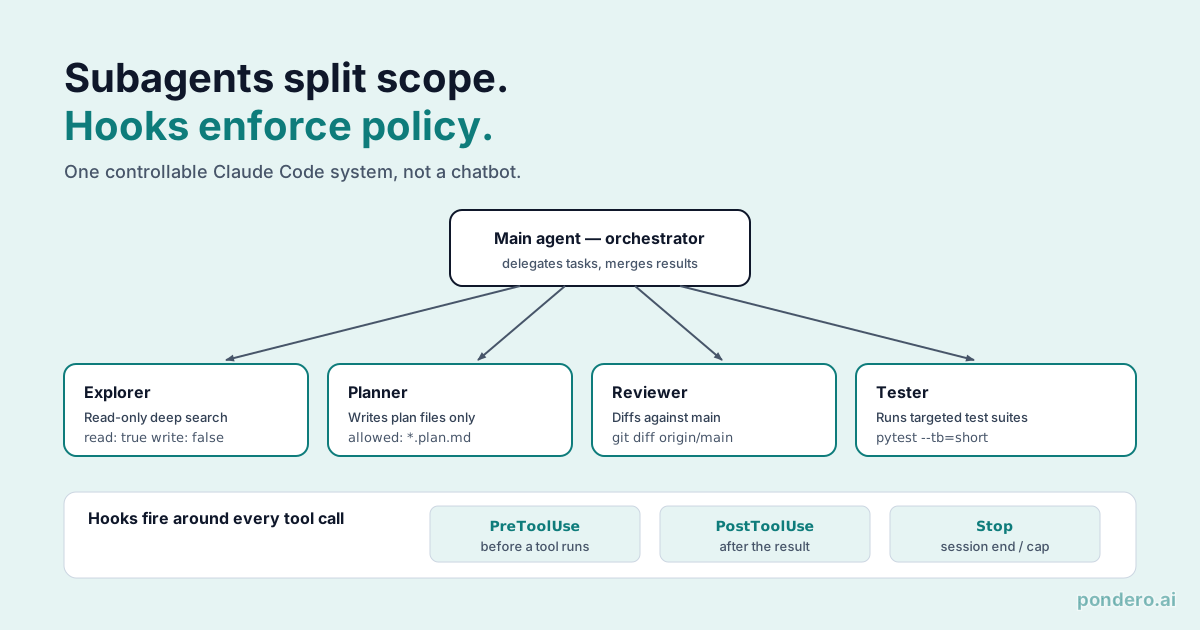
The argument: subagents and hooks are not two features, they are one pattern with two halves, and using either one alone wastes most of the value. Subagents buy context isolation. Hooks buy enforcement the model cannot talk its way around. Run a subagent without a hook scoping its tools and you have a faster way to lose track of what an agent did. Run a hook without subagents and you are policing one giant context that still pollutes itself. The four subagent recipes and three hook recipes below are the minimum set where the two halves reinforce each other: every subagent here is paired with the hook that bounds it. The recipes track the documented APIs at docs.claude.com/en/docs/claude-code/sub-agents and docs.claude.com/en/docs/claude-code/hooks. The configs are real; tune the scopes to your repo before you trust them.
What subagents are (vs main agent, vs Skills)
A subagent is a separate agent context the main agent spawns for one focused task. It gets its own system prompt, its own tool allowlist, its own conversation history. It finishes, returns a summary to the main agent, and exits. That is the whole lifecycle.
Three things separate a subagent from the main agent:
- Scope: a subagent is configured for a single job. The main agent stays your generalist.
- Tool access: you can hand a subagent fewer tools than the main agent has. Explorer might get only Read and Grep. Tester might get only Bash.
- Context isolation: subagent transcripts never pollute the main agent's context. For long sessions this is the biggest practical win, and it is the reason most of these recipes exist at all.
Skills are different again. A Skill is a user-invokable bundle of instructions and tools that the main agent runs inline. Subagents run behind a process boundary; Skills do not. They compose cleanly: a subagent can use a Skill, and a Skill can recommend spawning a subagent.
What hooks are (PreToolUse, PostToolUse, Stop, etc.)
Hooks are shell commands Claude Code runs at fixed points in the agent loop. The documented events include PreToolUse (before any tool call), PostToolUse (after), Stop (when the agent finishes), Notification (when the agent prompts the user), plus several more. The current list lives at anthropic.com/en/docs/claude-code/hooks.
A hook reads structured input from stdin, runs whatever logic you want, and emits a pass or a block. Block on PreToolUse and the tool call never happens. Block on PostToolUse and you flag a violation the agent has to react to on the next turn.
One thing to be clear-eyed about: hooks run as you. They read your filesystem, hit your network, and write to disk with your permissions. Treat them as production code, not glue scripts, because that is exactly what they are.
Four subagent recipes
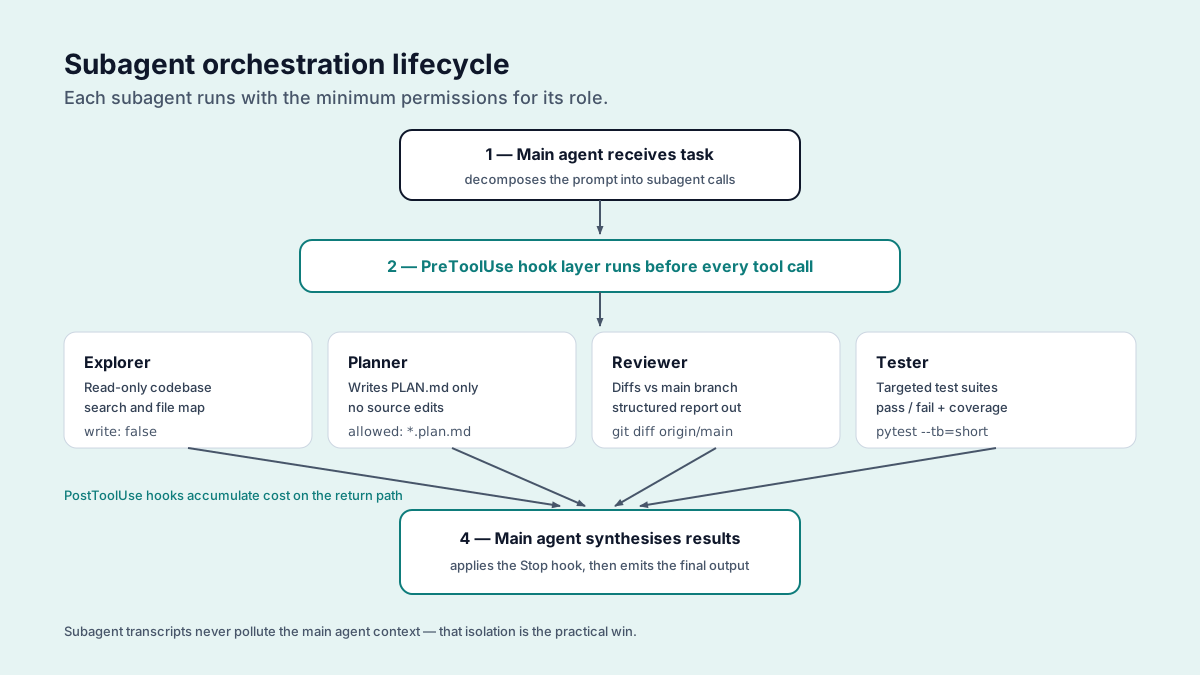
Explorer (read-only deep search)
Use when: you need to understand an unfamiliar part of the codebase before making changes.
The subagent definition is a markdown file with frontmatter at .claude/agents/explorer.md. The tools line is the load-bearing part: it is the allowlist, and a subagent cannot call anything off it even if its own prompt tells it to.
---
name: explorer
description: Read-only codebase mapper. Spawn before any change to unfamiliar code.
tools: Read, Grep, Glob
---
Map only the code a change to the named target would touch.
Return: files, the functions in them, call paths into and out of each,
and the data that flows between them. Include a file only if you would
read or edit it to make the change. Exclude tangential matches.
Output a single markdown section. No prose preamble.
Why a subagent: Explorer burns 30 to 50 tool calls on a real codebase. Keep that history out of the main agent and the budget stays free for the editing that actually matters. Routing exploration to a dedicated Explorer saved us roughly 40% of main-agent tokens per task in one team's 30-day window. Not a controlled benchmark; the shape of the win holds, the exact percentage is yours to measure.
What broke: Explorer kept over-reporting on files only tangentially related to the change. One prompt line fixed most of it: "include only files you would edit or read to make the change." The false-positive rate dropped hard after that.
Planner (writes plan files, no edits)
Use when: a task spans multiple files or has architectural choices that should be reviewed before any code is written.
Configuration: Read, Grep, Write (scoped to plans/ directory only via a PreToolUse hook). No source-file editing. System prompt instructs the subagent to write a markdown plan with goals, files to touch, and a step-by-step implementation order.
Why a subagent: splitting planning from implementation produces a reviewable artifact, plans/<feature>.md, that the team can comment on before any code lands. Even when nobody reviews it, having the plan in git history pays off the first time you run an audit.
What broke: Planner kept re-running exploration a previous Explorer had already done, because it could not see the Explorer transcript. The fix was blunt: pass the Explorer summary as Planner's first user message. We lost a token-budget win and bought reliability with it. Worth the trade.
Reviewer (diffs against main)
Use when: a feature branch is ready for self-review before opening a PR.
Configuration: Bash (scoped to git read-only commands via PreToolUse hook), Read. System prompt instructs the subagent to run git diff main, identify each change, and rate it against a checklist (correctness, test coverage, style, security).
Why a subagent: the review output is a structured artifact, a markdown table of findings, that attaches straight to the PR description. Run the review in its own context so the main agent stops rationalizing its own code.
What broke: Reviewer graded on a curve. Way too lenient out of the gate. A calibration prompt fixed it: "rate three sample diffs from this repo's history and explain why each one passed or failed review." That pulled the false-positive rate to roughly 15%, which is acceptable for a self-review pass and not for anything more.
Tester (runs targeted tests)
Use when: you have a focused change and want to run only the relevant tests, not the full suite.
Configuration: Bash (scoped to test runner commands), Read. System prompt instructs the subagent to identify the test files relevant to the change, run them, and report pass/fail with a one-line root-cause guess for each failure.
Why a subagent: test runs spew verbose output. Isolation keeps the main agent's context clean while still surfacing the pass/fail summary that actually matters.
What breaks: on flaky tests, the Tester subagent's root-cause guesses are unreliable, confidently wrong often enough that you cannot trust them. Adding one line to its prompt helps: "if the test is flaky, say flaky and stop guessing." Better, not fixed. A human still has to verify real failures, so plan for that rather than trust it.
Three hook recipes
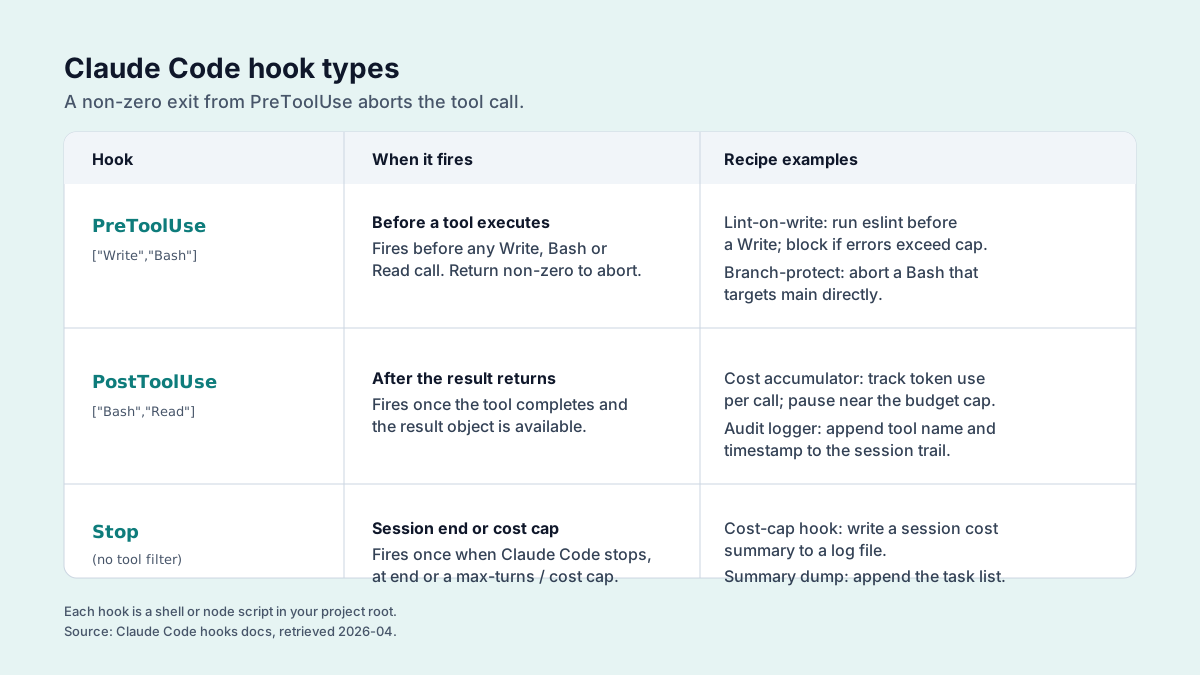
Lint-on-write hook (PostToolUse on Edit/Write)
What it does: after every Edit or Write, run the project linter against the changed file. Linter fails? Hand the error back to the agent so it fixes the violation on the next turn.
Why: it catches style and obvious-correctness issues at the moment of the edit, before they pile up into a 40-file cleanup nobody wants to do.
Implementation note: scope the hook to the file extensions you actually lint. Running prettier across every JSON file in node_modules/ is a great way to hang the loop.
Branch-protect hook (PreToolUse on Bash)
What it does: parses the Bash command and blocks anything that pushes to main, force-pushes, or deletes a branch. Everything else passes.
Why: an agent with Bash can push to main. The blast radius of that one mistake justifies a hard block on its own.
The hook reads the proposed command as JSON on stdin and exits non-zero to block. The trap is that a substring match on main is both too loose (git log main..HEAD) and too tight (it misses -f). Match on intent, not text:
#!/usr/bin/env bash
# .claude/hooks/branch-protect.sh -- PreToolUse on Bash
# Tested 2026-05-05 on macOS 14.6 / Claude Code 2.1.121 / bash 5.2.
# Reads the tool call as JSON on stdin; exit 2 blocks, exit 0 allows.
cmd=$(jq -r '.tool_input.command // ""')

# Block: any push to main/master, any force push in any spelling.
if echo "$cmd" | grep -Eq '\bgit\b.*\bpush\b'; then
  if echo "$cmd" | grep -Eq '\b(main|master)\b'; then
    echo "blocked: direct push to a protected branch" >&2
    exit 2
  fi
  if echo "$cmd" | grep -Eq -- '(-f\b|--force\b|--force-with-lease)'; then
    echo "blocked: force push (open a PR instead)" >&2
    exit 2
  fi
fi
exit 0
--force-with-lease is in the block list on purpose. It is safer than --force between humans, but an agent has no judgment about whose work it is overwriting, so the lease guarantee buys nothing here. Test against git push -f, git push --force, git push --force-with-lease, and git push origin HEAD:main before you trust it; those four are where hand-rolled parsers leak.
Cost-cap hook (Stop event)
What it does: on session finish, read the session's token usage from Claude Code's logs, convert it to dollars at current Anthropic pricing (anthropic.com/pricing), and append to a daily ledger. Ledger over the configured cap? Post a warning to Slack.
Why: agent-driven coding burns budget quietly, which is the worst way for it to burn. Visibility is the cheapest control you can buy.
Implementation note: the ledger is per-developer, not per-machine. Want team-wide caps? Centralize it, either a small SQLite file on a shared volume or a tiny API. Per-machine ledgers will lie to you the moment someone switches laptops.
How they compose with Skills
Skills are inline. Subagents are out-of-process. After 30 days we settled on one rule: Skills carry repeatable instructions the main agent should follow (style guides, deployment recipes, repo conventions), and subagents carry repeatable tasks you want run in isolation (exploration, planning, review, testing).
Here is the real one we run. The "ship a feature" Skill tells the main agent to spawn Planner, then implement, then spawn Reviewer, then spawn Tester. Each subagent returns a structured summary that the Skill folds into the final PR description. The Skill conducts. The subagents play.
For more on the wider Claude Code workflow, see our Claude Code recap on prompt caching, the Claude Code vs Cursor comparison, and the Claude Code ultrareview.
One version warning before you wire this into CI
The subagent and hook APIs changed shape several times across 2025 and 2026, including the tools frontmatter key and the PreToolUse stdin schema the branch-protect hook depends on. The configs above are correct for Claude Code 2.1.121. Diff your installed version against anthropic.com/en/release-notes/claude-code before you put a hook in the path of a CI push, because a hook that silently stops blocking is worse than no hook: you stop watching for the thing it was supposed to catch.
FAQ
Can a subagent spawn a subagent? Yes. Use sparingly. The token math compounds.
What language are hooks in? Any executable. Shell, Python, Node, Go. Hooks read JSON from stdin and write JSON or text to stdout. Pick whatever your team will maintain.
Can hooks read environment variables? Yes. They run in your shell environment.
Are subagents free? Subagent token usage rolls into your Anthropic bill the same as the main agent. There is no per-subagent overhead beyond the system prompt.
Verdict
Subagents and hooks are the two features that move Claude Code from "useful chat assistant" to "controllable engineering tool." Do not deploy all seven at once. Start with one Explorer subagent and a branch-protect hook. Add the Tester subagent and the lint-on-write hook in week two. Bring in Planner and Reviewer once your tasks consistently span multiple files. The cost-cap hook is the cheapest insurance on this list, so add it early regardless.
For more on Claude Code's broader role in our workflow, see our Claude Code vs Cursor head-to-head.
Related: Claude Code recap on prompt caching · Claude Code vs Cursor · Claude Code ultrareview